
Introduction
This article is very similar to the one Ulises wrote about how he reduced a 5-hour process to 5 minutes, but in a different context. Here we are not optimizing NodeJS code, but Python applied to Data Engineering, and in this case we reduced a process from 11 hours to 37 minutes. But let me give you some context first:
Problems (Winter is coming)
We currently use a tool called Apache Airflow to manage process automation. With it, you can schedule processes using a crontab so that they run automatically, executing tasks defined in Python code.
One of the many processes we have is data extraction from providers and its subsequent transformation to adapt it to our domain. This process normally took around 5 hours, which was somewhat acceptable for several reasons:
- It’s an automated process that usually runs overnight, so by early morning it’s completed.
- It handles a large volume of data, and all operations take time.
- It’s not needed in real-time, so it isn’t critical for any other team.
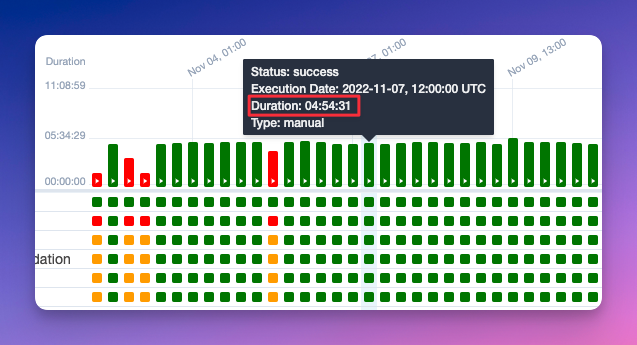
Here’s a screenshot showing that while the process occasionally fails, it can be fixed with some review and is generally stable:
And winter arrived
For one reason or another, a few more million records were added to the queue, which ended up drastically increasing execution times — specifically, from 5 hours to 11:
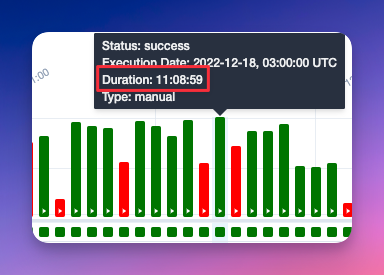
This was becoming unmanageable and unsustainable: a process taking almost half a day, run twice in 24 hours… do the math.
Why did this happen?
For data processing, the go-to library is Pandas, which works very well. However, for huge datasets, its performance is poor. That’s where Dask comes in — it’s designed to optimize large volumes of data.
Dask outperforms Pandas on large datasets, but it can be tricky if not used correctly. There are many books with best practices, including Data Science at Scale with Python and Dask.
So we suspected we were doing something wrong with Dask and decided to review the code.
Mysterious mysteries
First, we checked what the process did:
It collects 3 datasets, merges them into one, and processes the data according to a priority list based on the data source. We call this a
provider_rank_list(keep this in mind, we’ll come back to it).
The 3 source datasets aren’t single files; they are partitioned so that Dask can process them more easily. Here we noticed the partitions were tiny — 1028 partitions of 1-2 MB each. This kills Dask, and all its advantages become disadvantages.
One of the improvements we implemented was reducing the 1028 partitions into larger files (but keeping partitions so Dask can still operate efficiently).
Here’s the key tip of the day:
If you work with Dask, make sure your partitions match your data volume. Avoid too many tiny partitions or too few huge ones. Official documentation recommends partitions of ~100 MB.
Here’s a snippet of code to illustrate the idea:
input_dataset = dask.read_dask(path_to_file)
dataset_to_process = input_dataset.repartition(partition_size=self._partition_size) # Fix input to ensure it doesn’t break anything
...
Lots of code doing other things...
...
result_dataframe = processed_dataset.repartition(partition_size=self._partition_size) # Fix output size in case it grew during processing
Why set partition size instead of a fixed number of files?
Good question. Dask allows two ways to partition: npartitions and partition_size.
npartitionsfixes the exact number of partitions.partition_sizefixes the maximum size of each partition and forces processing of the Dask DataFrame. This may seem negative because it uses more resources and time, but in our case, processing was inevitable since saving transforms it to Pandas (Dask is built on Pandas).
TL;DR: Repartitioning was tricky, so we read a lot of documentation to choose the best approach.
And… the story isn’t over yet :(
Did performance improve? Yes. Was it perfect? No. The process still took several hours and was still impractical. We had to keep searching…
Until we found this line of code:
dataframe.set_index(provider_priority_column)What does set_index do? -> It sorts the dataframe based on the parameter you specify. In this case, since we want to filter data based on providers, we want to sort them based on some numbers. For example:
{"cool_provider": 0, "nice_provider": 1, "not_so_cool_provider": 2}Previously, when this was implemented, it seemed cool and feasible… But it wasn’t scalable at all. As the data volume increased, Dask’s performance for sorting became worse.
If you’ve made it this far, you might expect an ultra-complex solution, almost like a magic recipe… I’m sorry to say that the solution has nothing to do with code but with how we approached the problem.
Solution
As mentioned before, the process takes 3 datasets and combines them into 1 to process the data based on a priority_rank_list. We thought of concatenating (it’s an almost instant operation that consumes very little) based on the priority list. This way, we forget about sorting the result because it will already come sorted and involve much less workload. As simple as that. Showing this in code doesn’t make much sense, but the results speak for themselves:
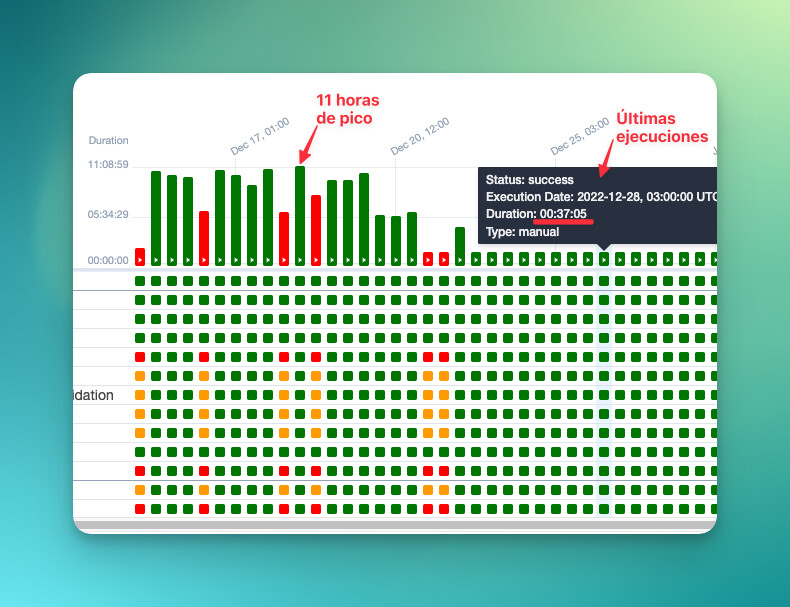
And if you’re interested, we extended this approach to the preceding processes. Here’s a table with the time improvements:
Before
| Process 1 | Process 2 | Process 3 | Total time | |
|---|---|---|---|---|
| Provider A | ~20 min | ~8h50min | ~11 horas | 20h10min |
| Provider B | ~20 min | ~3h30min | ~11 horas | 14h50min |
| Provider C | ~10 min | ~7h | ~11 horas | 11h17min |
After
| Process 1 | Process 2 | Process 3 | Total time | |
|---|---|---|---|---|
| Provider A | ~20 min | ~1h | ~1-2h | 3h20min |
| Provider B | ~20 min | ~45min | ~1-2h | 3h5min |
| Provider C | ~10 min | ~7min | ~1-2h | 2h17min |
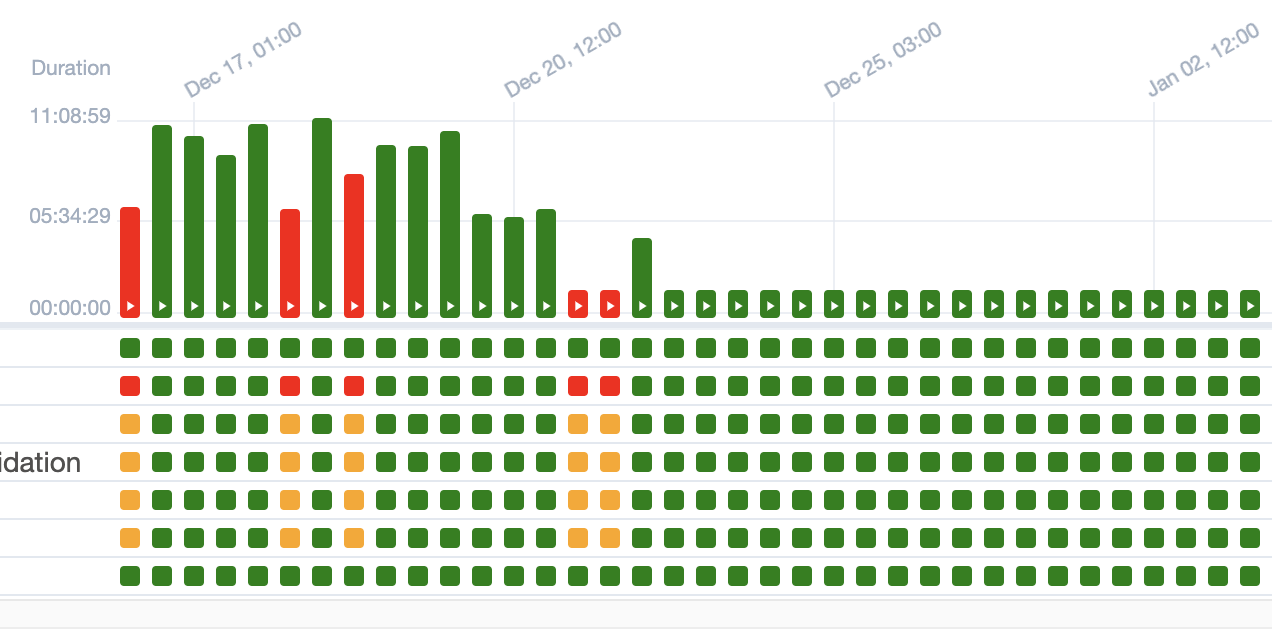
At the end of the day, we not only saved execution time but also resources from the Kubernetes Pods that run this and AWS machines. Which translates into less money spent. And as they say: A picture is worth a thousand words, so here’s a final photo showing how the storm calmed down:
Comments